
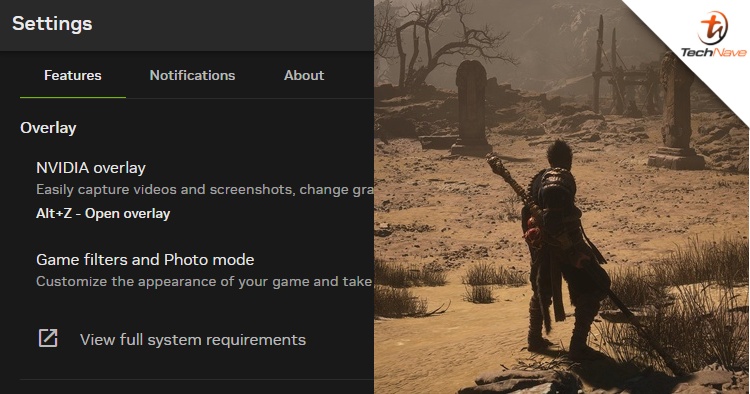
If you are a PC gamer, you might have noticed some frame lag issues on your games recently. Well, turns out that the culprit was none other than the new NVIDIA app, thanks to the discovery by Sebastian Castellanos.
Although the new NVIDIA app was introduced a few weeks ago, a recent update seems to have affected video games' frame rate performance. In Sebastian's case, Unreal Engine 5 games like Black Myth Wukong and The Talos Principle 2 suffered a lot. But other gamers like myself also experienced the same thing even if it's an old game (case in point, Far Cry 5).
Sebastian initially uninstalled the NVIDIA app which worked and gave an extra 15% performance back. But a few days later, he decided to reinstall it back and fixed the issue by turning off the "Game Filters and Photo mode" option. To do that, you have to visit the Settings page. However, he noted that this fix might not work for everyone.
Now that I have some time, I made a couple of benchmark runs with this option disabled vs enabled in both Black Myth: Wukong and The Talos Principle 2 using @CapFrameX, and I'm seeing some huge perf gains by turning the "Game filters and Photo mode" option off: pic.twitter.com/7QuxCEqKmQ
— Sebastian Castellanos (@Sebasti66855537) December 16, 2024
Turning that option off seems to do the trick, as I was able to run my Far Cry 5 game smoothly. To back it up further, Sebastian did a couple of CapFrameX benchmark tests on Black Myth Wukong and The Talos Principle 2. Suffice it to say, the difference between the option disabled and enabled is huge.
According to reports, NVIDIA is already aware of this bug issue and now investigating the issue as we speak. Well, hopefully, it gets fixed as soon as possible before the Christmas holiday season.





COMMENTS