

Image by Reuters
Concerned about privacy on Facebook, or maybe you never update your privacy settings because you don't want to go through the complicated menu? Well, this should be good news for you. Facebook just gave Privacy Checkup an update and it's now a lot more user-friendly.
By searching for "Privacy Checkup" using the search bar, you can now directly jump to the four areas of settings and quickly make changes, whether through a PC or your smartphone. For example, if you select "How people can find you on Facebook", you'll find the relevant settings right there; we recommend setting this to "Friends of friends". Of course, most of these settings have always been around. It's just that the update makes it easier for you to access them, which is great if are the type that gets confused when trying to sort through it in the menu.
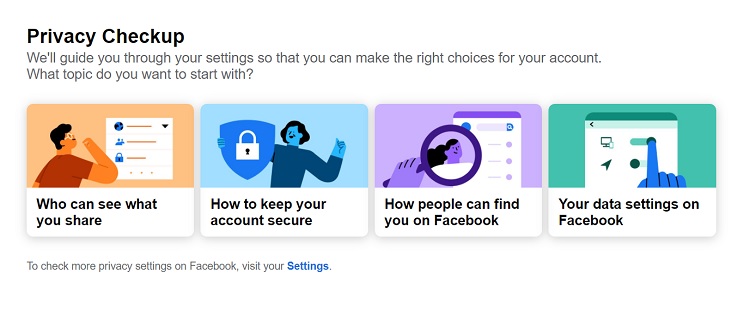
Besides that, the new update makes it easier for you when it comes to changing your password and enabling login notifications. The fourth group of settings should also be useful for you, as it is where you can remove access to your Facebook data for third-party services'. There are likely a lot of such programs that you no longer use but continue to have access to your latest data so removing them is a good idea.
If you have the time, you should definitely go through Privacy Checkup and update your settings. For those who already have, do you find this easier to use? Let us know on our Facebook page! Also, stay tuned to TechNave.com for more news like this.


COMMENTS