
Google is constantly expanding the usability of Gemini. The AI platform not only works on smartphones now, but can also function on various Google-based platforms for Google Workspace users. For instance, you can get Gemini to help you with spreadsheets in Google Sheets. In fact, Google has added more functions to it.
Multi-steps with one prompt
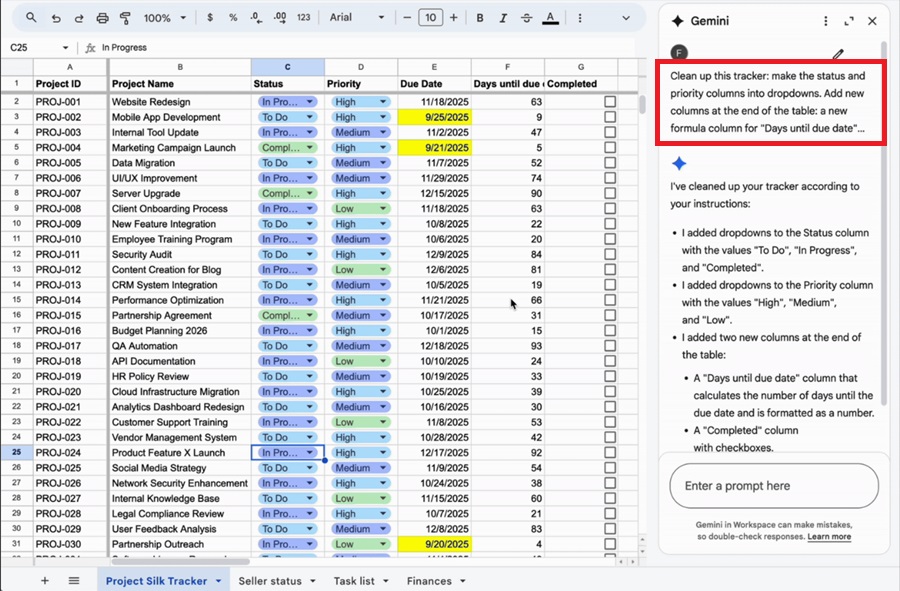
Yesterday, Google announced several new updates to Gemini in Google Sheets. First, Gemini can now perform multiple tasks or actions in Google Sheets using one prompt. This allows you to input a longer, more complex prompt in one go instead of using multiple simple ones.
In the given example, users can now prompt Gemini to reformat a project plan tracker based on several criteria. The specifics were all described in one prompt and executed in sequence. As usual, Gemini will provide a summary of what was done during the editing process. Gemini can also be asked to perform multiple actions based on the analysis of the spreadsheet.
Added support
Besides that, Google has expanded the tasks Gemini AI can perform in Google Sheets. These actions are mostly for formatting, data entry, data editing, filtering, structure, and organisation. Even if you're not a Google Sheets pro, Gemini AI can help perform the edits you need. Of course, you'll need a Google Workspace subscription and know how to type precise prompts.
With that said, have you tried using Gemini AI with Google Sheets? Let us know in the comments below!




COMMENTS