

Gigabit Internet speeds is finally available in Malaysia thanks to TIME Internet which offers 1Gbps speeds for only RM199. However, to achieve gigabit speeds, there are various factors that have to be taken into consideration such as the router, what cables to use, whether your device supports those speeds, and WiFi transmission speeds.
The first question that comes to mind is why you would you need a 1Gbps connection in the first place. But, a 1Gbps connection would be great if you like streaming 4k resolution videos from Youtube, Twitch, or even other video hosting platforms simultaneously to multiple users on the same network with minimal to virtually no buffering. If you're a hardcore online gamer who streams with Twitch then this sort of speed also practically guarantees lag free gaming performance. Not only that, when it comes to downloading large files, a 1Gbps connection could theoretically download a 100GB file in under 15 minutes as compared to a 10Mbps line which is only able to finish the download in 23 hours.
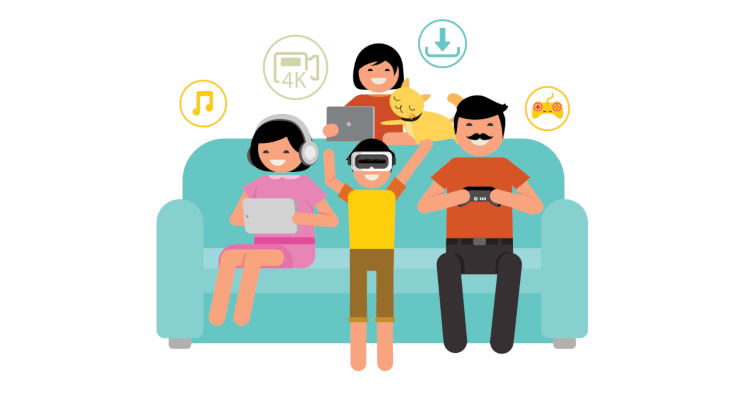
Talking more about gaming and other users, if you have a 1Gbps connection, you won't experience any lags or stutters when playing online games, even while other users on the same network are streaming their movies or downloading content while multiple game streamers on the same network would be able to stream their content to platforms such as Twitch, Tamago, Youtube and more at the highest quality possible at the same time as well. With the right equipment, a 1Gbps connection could comfortably support up to or even more than 30 users simultaneously and still have enough bandwidth for smart home appliances and other devices to communicate online. That being said let's find out how to achieve it.
How to achieve gigabit speeds
In order to achieve gigabit speeds, it is very important to take the choice of routers into consideration, due to the fact that not all routers are made equal. Depending on the router, you might not be able achieve gigabit speeds. Routers offered by TIME such as the TP-Link AC1200 and the D-LINK DIR-822, which you can find out more on the manufacturer's website, would make a good starting point as these routers are capable of achieving 1Gbps speeds. Due to hardware limitations however, older routers usually would not be able to support speeds as high as 1Gbps, so be wary about that.
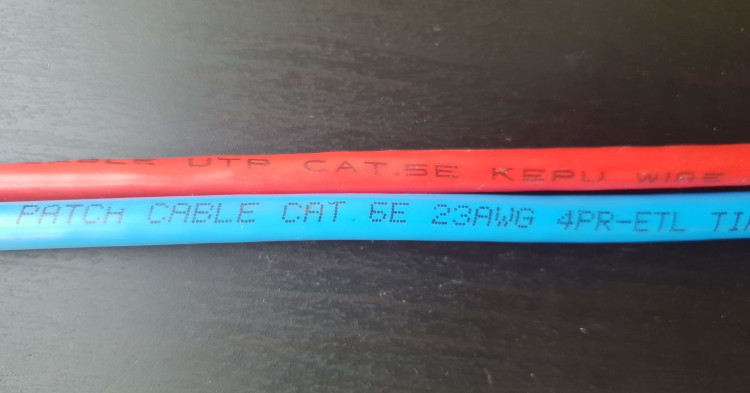
Red Cable: CAT5E, Blue Cable: CAT6
We heartily recommend connecting to the router via LAN cable instead of WiFi as a direct connection to the router by using either a CAT5E or CAT6 cable because as of now, only wired connection is capable of achieving 1Gbps speed. To give a little explanation on why, a typical CAT5E and CAT6 cable has transmission speeds of up to 1Gbps and 10Gbps respectively. I might add that it is also very easy to differentiate between the cables by refering to the label printed along the cable sleeve as shown above. WiFi routers offered by TIME on the other hand, will get you speeds of up to 488Mbps download on 5Ghz wireless frequency and 132Mbps for 2.4Ghz based on measurements done by TIME.
Not only that, as WiFi is also another form of radio frequency technology, it is also susceptible to interference from other sources such as other WiFi signals, microwave ovens, radio transmitter and more which could affect the maximum speed of the connection. So, for direct router connections, always try to use cable before WiFi.
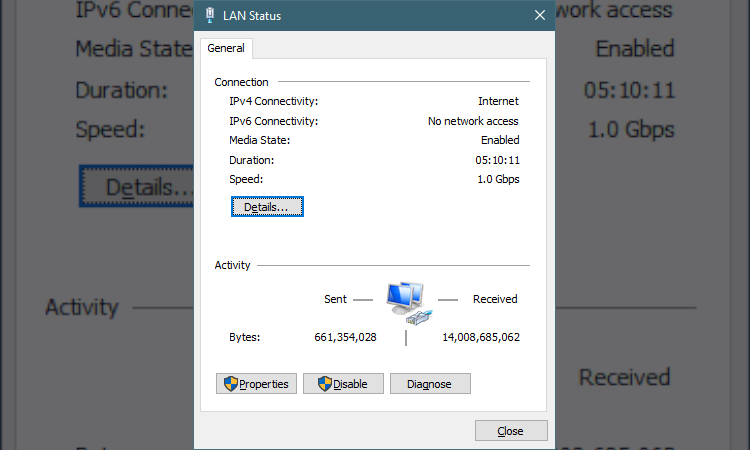
Network Status with Speed of 1.0 Gbps
Lastly, devices such as smartphones, computers and tablets could also affect the maximum speed at which the devices are able to download at. You can find out the maximum speed your Windows PC is able to support by pressing the start button on your keyboard, type out “ncpa.cpl” in the search, press enter and the Network Connections window will pop-up. Right click on the current network adapter you are using and select Status which will bring up a Status window that shows the information of the network adapter.
Based on the screenshot above, the device I am using is able to support up to 1Gbps connection which is clearly indicated in “Speed” which is just above the “Details” button. For Android and Apple users, you can check out either the manufacturer’s official website or even TechNave.com to find out the maximum supported speeds of these devices.

Speed Test with LAN cable
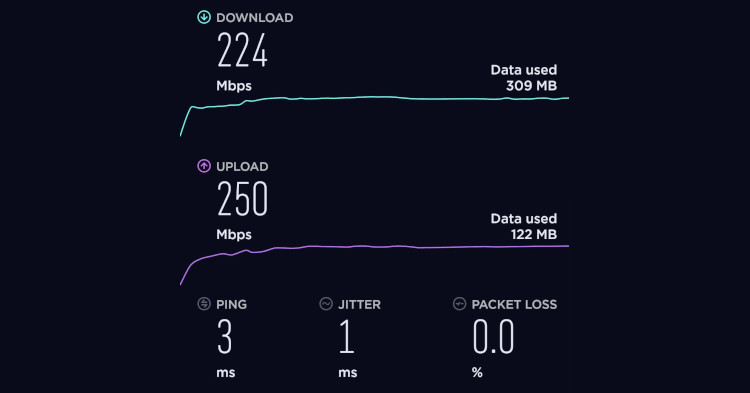
Speed test with WiFi connection
Taking all of the notes mentioned above into consideration, I am able to achieve close to 1Gbps download speed as well as upload speeds as high as 500Mbps through a LAN cable connection to the router.
You too can get gigabit speeds!
We hope that with all the information provided in this article, you too will be able to achieve gigabit speeds as well! Of course you'll need a 1Gbps Internet plan but you can sign up with TIME’s 1Gbps plan worth RM199 a month on their official website and get RM100 off your first bill. However, if TIME’s 1Gbps plan does not pique your interest, you can always opt for the TIME 500Mbps plan which costs RM139 a month or even the TIME 100Mbps plan for RM99 a month. For more articles like these, stay tuned to TechNave.com.




COMMENTS