
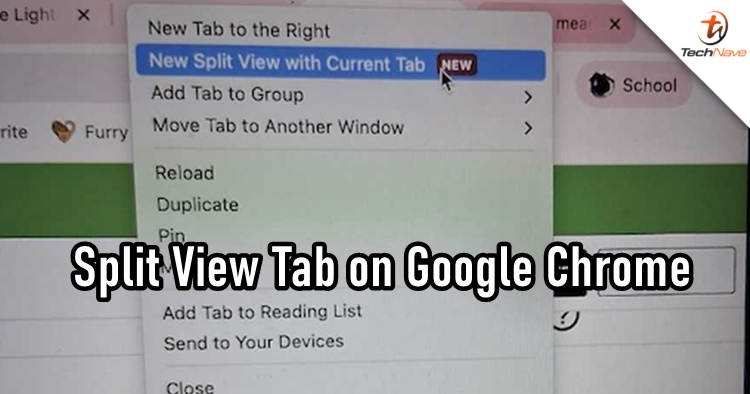
Google Chrome has quietly added a feature that lets you view two web pages side by side within a single browser window. Known as Split View, this capability helps reduce the constant back-and-forth between tabs by placing them next to each other for easier comparison and simultaneous browsing. Users who enable this now see a dedicated option when interacting with tabs that wasn’t available in earlier versions of the browser.
How to Activate Split View in Your Browser
Once your Chrome browser is updated to a version that supports Split View, the process to use it is straightforward. Start by restarting Chrome to ensure you’re on the latest build. Then right-click an open tab and look for the option labelled New Split View with Current Tab in the context menu. Selecting this will split your current tab vertically and let you choose another tab to display on the other side.
Chrome also supports other ways to engage Split View. You can drag and drop a tab toward the left or right edge of the window to trigger the split mode, or choose Add tab to new split view on an existing paired tab. This flexibility means you don’t need to open separate browser windows just to compare content or manage multiple tasks at once.
What You Can Do Within Split View
Once two tabs share the screen, each pane acts like a full-function web page. You can scroll, type, interact with forms and media, and browse normally on both sides independently. Controls in the toolbar help you swap which page appears on the left or right, close individual panes, or return to the traditional single-tab view as needed.
Because Split View is now part of Chrome’s native toolkit for tab management, it streamlines workflows that once required juggling multiple windows or relying on third-party extensions. This refinement reflects a broader trend in the browser space toward built-in tools that boost productivity without extra add-ons.
Wrapping Up
If you don't see it on your Google Chrome web browser, the feature is probably still rolling out to some users, but we think it should be available to everyone by now. What do you think of the feature? Let us know and do stay tuned for more trending tech news at TechNave.com.





COMMENTS