
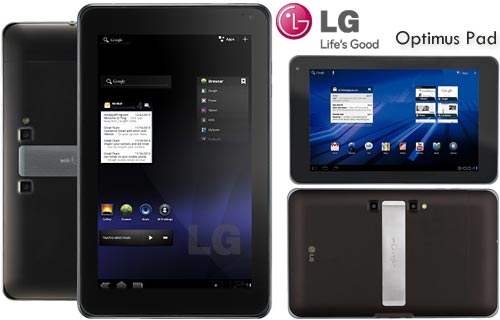
The LG Optimus Pad comes with an 8.9in touchscreen and a built-in 3D camera but with no GSM voice communication capabilities.
Impressive specs, but 3D isn't for everyone
LG’s gone for a different approach to rivals, along with an 8.9-inch screen, the Optimus Pad includes dual 5-megapixel stills camera for capturing 720p 3D movies. It comes in a WiFi and 3G version and includes 32GB storage.
While it’s certainly innovative, the 3D camera also screams “this device needs gimmicks to stand out”. But is the LG Optimus Pad a one-trick-pony - albeit a 3D one?
LG Optimus Pad: Design
First impressions of the Optimus Pad are underwhelming. It’s well built, but at 12.7mm deep it’s chunky next to the 8.8mm iPad 2 and doesn’t feel as premium as the Motorola Xoom. At 630g, it’s a reasonably weight to hold with one hand.
Along the bottom are HDMI mini and micro SD slots. Surprisingly it doesn’t support DLNA though. Slide off the cover on one side to access the Sim card compartment. Located on either side, the stereo speakers are laughably quiet, very much suited to viewing for one.
LG Optimus Pad: Screen
Dig deeper and you’re rewarded with a very fine, 8.9-inch, 1280x768 screen that can be held vertically with one hand. We really like the 8.9-inch size which sits somewhere between the PlayBook and Xoom, although it’s clearly designed to be used horizontally.
The screen is the right size for watching movies comfortably, ably handling motion in our HD test clips, with detail and sharpness on par with the Asus Eee Pad, if not quite as good as the iPad 2. Off-angle viewing is respectable, though we did find that colour balance was oversaturated, with a slight greenish tint which other Honeycomb tablets.
LG Optimus Pad: OS and Control
Running Google’s Honeycomb OS, the interface is a joy to use. Honeycomb might not be as instantly simple to use as iOS, with a few quirks. Instead of solid buttons you get touchsensitve Android home, back and multi-tasking keys, the latter displaying open applications you can quickly swap between. Neat features include being able to drag apps and shortcuts directly onto a homescreen via an overview.
Powered by a Nvidia Tegra 2 processor, responsive multitouch controls ensure it never feels slow. Multitouch controls work well and you also get Flash support.
LG Optimus Pad: Camera & Video
Five-meg stills are the good – far better than many tablets we’ve seen - colours are natural, yet sharp and it deals with high and low contrast situations pretty well. 1280x720p 30fps video is smooth with natural colours if a bit soft, 1080p footage is a bit blocky, but accompanying audio is loud and clear. We do feel that tablets are not ideal for shooting video and stills.
Because the screen isn’t polarised you can't actually see the 3D effect when shooting. Instead choose from four views: Mixed, Anaglyph (you can wear glasses) Single and Side by Side views, along with a depth control. To view the footage you need a 3D TV or to use the You Tube 3D channel.
3D stills and video are fine, not quite up to the standard of a camcorder or camera, but that’s hardly surprisingly. You can use depth controls to adjust the intensity of the 3D effect.
LG Optimus Pad: Battery
The word at MWC was that the battery in the Optimus Pad will keep chugging along for around nine hours while watching video before needing a recharge, but no-one’s been given a long enough hands-on period to verify this. The eight-to-ten hour mark seems to be the tablet benchmark from MWC this year though.
LG Optimus Pad: Verdict
I really like LG’s first Honeycomb tablet. While it stands out in a number of ways, it is perhaps for the wrong reasons. And internally, but for the cameras and SIM slot, it is virtually identical to its contemporaries.
But its smaller size definitely lends itself to more versatility than those 10.1” beasts. Coupled with a nice case (LG makes a great modular leather cover) and a compact Bluetooth keyboard, this could be the perfect setup for the laptop-weary road warrior. Weighing only 1.35lbs, it’s all muscle.
The Optimus Pad is a quality product backed by a very attractive, usable operating system. If money isn’t a factor, this is the one to get. If it is, wait a couple months until it drops the price. Who knows, they may even have upgraded it to Android 3.1 by then.



COMMENTS