
As a friendly reminder, Microsoft already announced that its Authenticator app will discontinue the ability to autofill passwords starting in July 2025. You can still access the app in Malaysia, but if you're using it, you ought to transfer all your saved passwords.
What Happens to Your Data?
Your saved credentials and payment info will sync to your Microsoft account, making them accessible via Microsoft Edge. Still, users who prefer third-party managers (like Bitwarden or iCloud Keychain) must export their passwords before the August deadline.
Despite removing password autofill, Authenticator will continue to support passkeys. Microsoft encourages users to transition to passwordless sign-ins, reflecting broader industry trust in FIDO-standard passkeys.
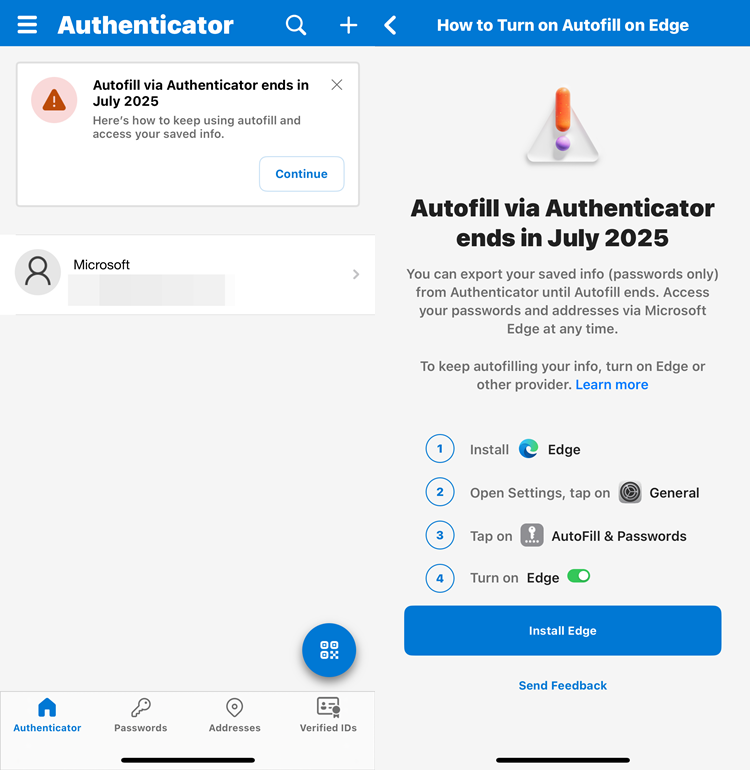
How To Export Your Saved Passwords to Microsoft Edge
The guide is already listed on the Authenticator app, but here's the step-by-step below:
- Install the Microsoft Edge app on your mobile
- After that, go to Settings > General (on iPhone) or Settings > Autofill (on Android)
- Select Autofill & Passwords (iPhone) or Autofill from (Android)
- Select Edge and start autofilling
Transition Timeline: What Users Need to Know
For your information, nobody can add or import new passwords into the Authenticator app since June 2025. For this month, autofill functionality will be disabled as mentioned, but existing passwords will remain accessible until the end of the month. Then in August 2025, all stored passwords will be deleted, and payment data will be wiped a month earlier.
That's all, folks. If you rely on the app’s password Autofill, act before July and August 2025 to export your credentials or switch to another manager. Stay safe and stay tuned for more trending tech news at TechNave.com.



COMMENTS