
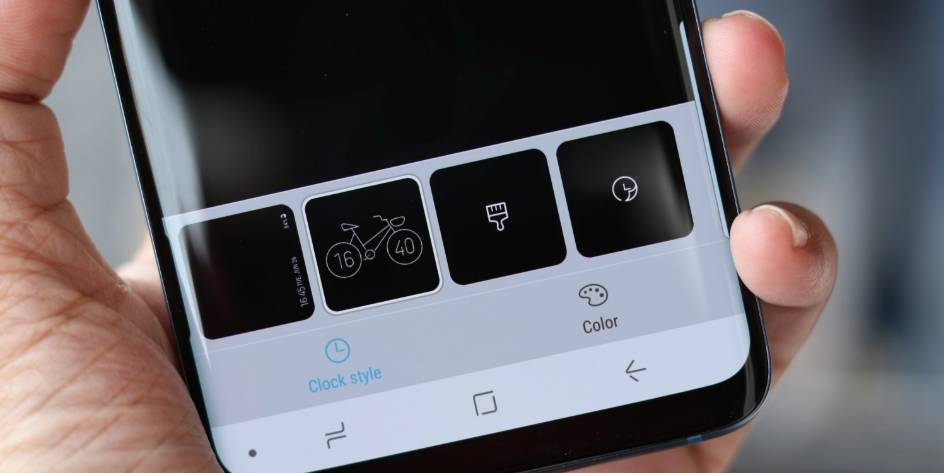
Are you tired of the same old clock and look from your Always On Display? There's an app called ClockFace which is part of Samsung Electronics' Good Lock 2018 UI app that allows Samsung Galaxy owners to customize their phones. That's the good news, the bad news? It's only available in the USA, UK, Australia, Canada, Singapore, and South Korea for now. But hey, if you're adventurous enough, you can always try it out.
As long as you have the latest Android 8.0 Oreo with Samsung Experience 9.0, your Galaxy phone is good to go with the ClockFace app that has around 30 different clock styles for your Always On Display. Not only you get to choose unique clock designs, but it's also said that you can change the colours too to your preference or the colour of your wallpaper.
If that sounds cool, you can actually head over to this website (with caution) to download and install the APK file from Sammobile.com. After that, below are the steps for your guide:
To use the new clock styles from ClockFace, download and install its APK file from our database, then follow the steps below.
1. Go to Settings -> Lock screen and security. Make sure you have Always On Display turned on for this.
2. If your Always On Display is not turned on yet, just toggle it on. When all set, go to Clock and Dagger FaceWidgets -> Clock style
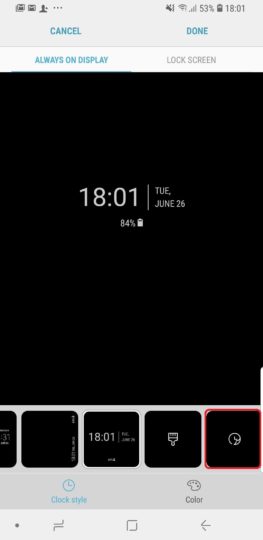
3. You will probably see a lot of different clock styles, but just skip it to the last one that is highlighted in the screenshot above.
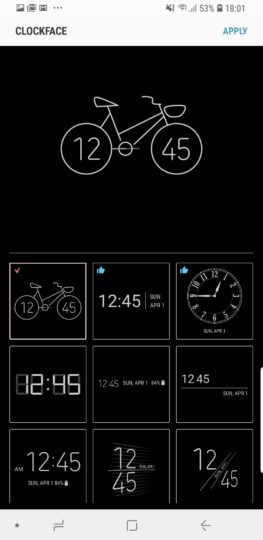
4. After entering, you will see a bunch of new clock style designs from the ClockFace app, then just choose the ones you like and tap Apply on the top right.
5. Lastly, the screen will transport you to the Always On Display menu. Tap Done on the top right and you're all set. Seems easy enough.
Whenever you want to change it again, just repeat the steps and you should be fine. If you would like to wait for Malaysia's version, we think it's probably best to sit it out and wait. Until then, have fun exploring and stay tuned for more Samsung news at TechNave.com.




COMMENTS