
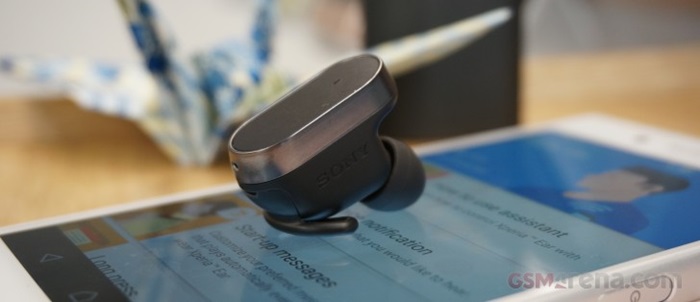
The Sony Xperia Ear
If you can recall back at MWC 2016 last February, Sony showcased their Sony Xperia Ear as part of the new Xperia accessory line up. What's special about the Xperia Ear is that it's wireless and a smart headset capable of recognising voice commands and head gestures. Sounds cool doesn't it? Well, you're in for a treat today because GSMArena.com got their hands on the device and showed us what's it like.
According to them, the Xperia Ear is lightweight and fits just right in the ear; it can go through at least two days without charging, and it can also detect automatically whether you have it in your ear or not. An app for the Xperia Ear is needed for the device to work, start-up messages can be configured from the app itself and you have the freedom to choose the notifications that you want to hear in hands-free mode.
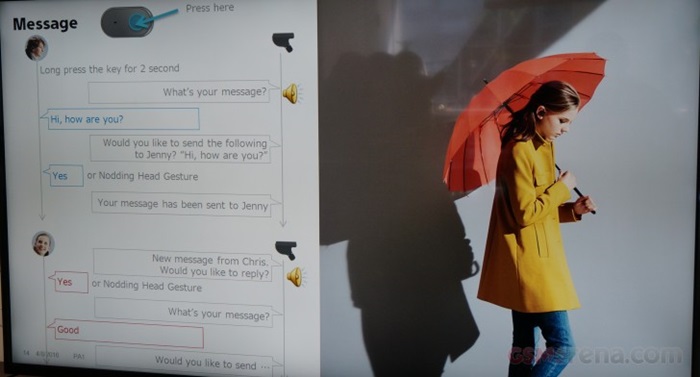
In addition, the device has a single button for controlling answers, end, or rejecting calls. It has long-press functionality which can be customised in the app as well; a short press will make the Xperia Ear assistant to appear. You can do a bunch of commands like:
For short press-
- Weather forecast
- Hear the time
- Search for stuff in Wikipedia
- Ask for street directions
- Send text messages
- Listen it read the most recent unread text messages
- Upcoming scheduled events
- Voice notifications for low battery
For long press:
- Send a message
- Tell you about your upcoming events
- Play or pause music
- Play a startup message - news, time, traffic, date, etc.
Lastly, navigation is available on the device too and can help the user to interact with a smartphone hands-free while driving. Really useful tool there, though they also said it's hard to press the button sometimes.

Will it be available in Malaysia? Time will tell, and we are sure that it's a useful device to have for busy people who are always on the move. If you want to see more picture samples, you may visit the source link below to check it out. Stay tuned for more news at Technave.com and TGIF!
[Source]




COMMENTS