
So we guess that some of you already heard, there is a wave of ransomware infections affecting various organizations globally on health care, manufacturing, energy (oil and gas), technology, food and beverage, education, media and communications, and the government. Known as the WannaCry/Wcry ransomware, here are some important information of what you should know, as well as tips by Trend Micro on how to defend yourself against it.
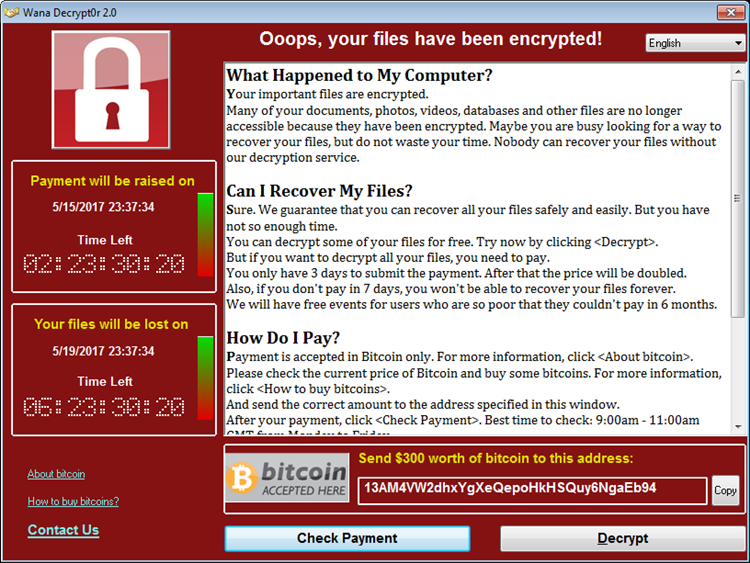
One of WannaCry’s ransom notes
Tracked by Trend Micro since last month, what the ransomware does is locking the Windows systems by showing a ransom note (now you know why it’s called ransomware). It only seems to attack older Windows-based systems which you and I know that many companies are guilty of. At this moment, Europe has the highest detection for WannaCry. However, it’s slowly invading into the Middle East, Japan, and several countries in the Asia Pacific (APAC) region.
How did this happen? It started as a security flaw in the Server Message Block (CVE-2017-0144), an exploit leaked by the Shadow Brokers group—the “EternalBlue” exploit, in particular. Microsoft’s Security Response Center (MSRC) Team addressed the vulnerability via MS17-010 released March, 2017. All it needs is just one user and everything in the network will be affected. Wannacry targets and encrypts 176 file types, holding database, multimedia and archive files, as well as Office documents as “hostages”. Using a fear factor tactic, it demands US$300 worth of Bitcoins from its victims, and continues to increase incrementally after a certain time limit for seven days, before the affected files are deleted.
So what can you do? No worries, here are some of the solutions and best practices that organizations can adopt and implement to safeguard their systems from threats like WannaCry:
- The ransomware exploits a vulnerability in SMB server. Patching is critical for defending against attacks that exploit security flaws. A patch for this issue is available for Windows systems, including those no longer supported by Microsoft. When organizations can’t patch directly, using a virtual patch can help mitigate the threat
- Deploying firewalls and detection and intrusion prevention systems can help reduce the spread of this threat. A security system that can proactively monitor attacks in the network also helps stops these threats
- Aside from using an exploit to spread, WannaCry reportedly also uses spam as entry point. Identifying red flags on socially engineered spam emails that contain system exploits helps. IT and system administrators should deploy security mechanisms that can protect endpoints from email-based malware
- WannaCry drops several malicious components in the system to conduct its encryption routine. Application control based on a whitelist can prevent unwanted and unknown applications from executing. Behavior monitoring can block unusual modifications to the system. Ransomware uses a number of techniques to infect a system; defenders should do the same to protect their systems
- WannaCry encrypts files stored on local systems and network shares. Implementing data categorization helps mitigate any damage incurred from a breach or attack by protecting critical data in case they are exposed
- Network segmentation can also help prevent the spread of this threat internally. Good network design can help contain the spread of this infection and reduce its impact on organizations
- Disable the SMB protocol on systems that do not require it. Running unneeded services gives more ways for an attacker to find an exploitable vulnerability
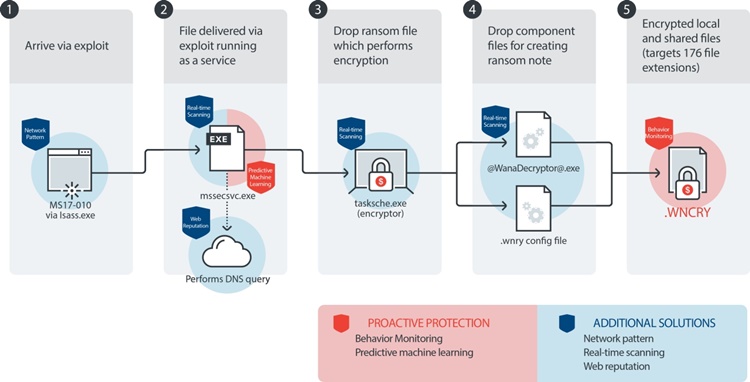
Trend Micro XGen Security detects and blocks all of WannaCry ransomware's infection stages
Or, if you prefer a reliable anti-virus program. Another solution is using Trend Micro Deep Discovery Email Inspector and InterScan Web Security, these programs can prevent ransomware from ever reaching end users. At the endpoint level, Trend Micro Smart Protection Suites deliver several capabilities like high fidelity machine learning, behavior monitoring and application control, and vulnerability shielding that minimizes the impact of this threat. Trend Micro Deep Discovery Inspector detects and blocks ransomware on networks, while Trend Micro Deep Security stops ransomware from reaching enterprise servers–regardless if they’re physical, virtual, or in the cloud.
For small businesses, Trend Micro Worry-Free Services Advanced offers cloud-based email gateway security through Hosted Email Security. Its endpoint protection also delivers several capabilities such as behavior monitoring and real-time web reputation in order detect and block ransomware.
For home users, Trend Micro Security 10 provides strong protection against ransomware by blocking malicious websites, emails, and files associated with this threat.
Furthermore, users can take advantage of Trend Micro’s free tools such as the Trend Micro Lock Screen Ransomware Tool, which is designed to detect and remove screen-locker ransomware. Trend Micro Crypto-Ransomware File Decryptor Tool can decrypt files affected by certain crypto-ransomware variants without having to pay the ransom in exchange for the decryption key.
For more information on Trend Micro detections and solutions, kindly visit their technical support page.




COMMENTS