
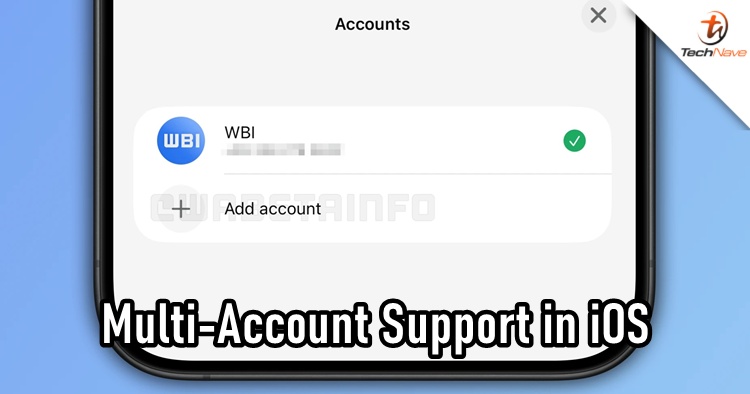
WhatsApp is rolling out a multi-account feature in its iOS TestFlight beta (version 25.34.10.72), allowing eligible users to add and switch between two separate WhatsApp accounts on the same device. For users who have multiple accounts on WhatsApp, this can be a useful feature in the future.
How It Works: Add and Switch Accounts Seamlessly
A new “Account List” section appears in the app’s Settings menu, or via a QR-code icon, letting users add a second account. This can be a completely new number, a previously used WhatsApp (or WhatsApp Business) account, or a “companion account” linked from another device by scanning its QR code. Users can manage up to two accounts from within the same app installation, without needing to log out or install a separate app.
Each Profile Is Fully Independent
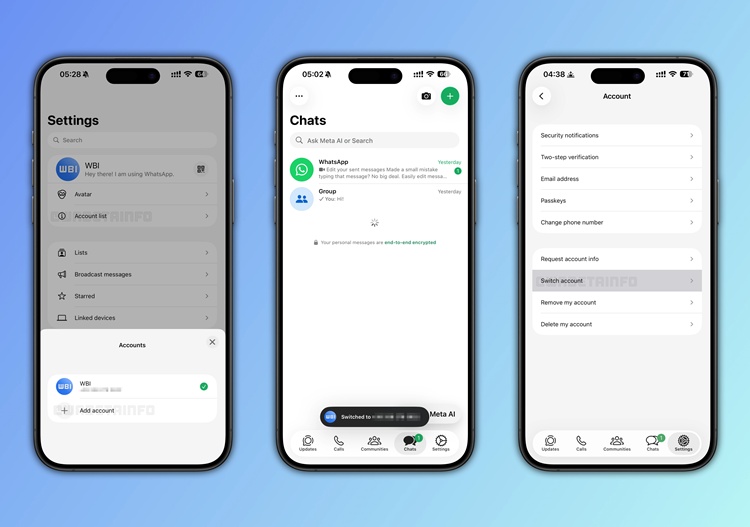
Every account added retains its own chat history, notification settings, backup schedules, media download preferences, and privacy configurations such as “last seen,” profile picture, and read receipts. Even app lock works per account: if you have enabled it, WhatsApp will require Face ID, Touch ID, or a passcode every time you switch to a locked profile.
Improved Notification Behaviour Between Accounts
When a message comes in on a secondary account, the notification clearly shows which account it’s from. That way, users can tell at a glance whether the message belongs to their first or second profile.
WhatsApp provides convenient shortcuts: once two accounts are configured, users can press and hold the Settings tab to bring up the “Account List,” or double-tap the tab to instantly switch. Switching is seamless, as no app restarts or re-authentication are required.
Feature Still in Beta, Rolling Out Gradually
Multi-account support is currently available to some beta testers via TestFlight and is being rolled out progressively. It is probably going to take some time, so we will have to wait until the feature is ready. Stay tuned for more trending tech news at TechNave.com.


COMMENTS