
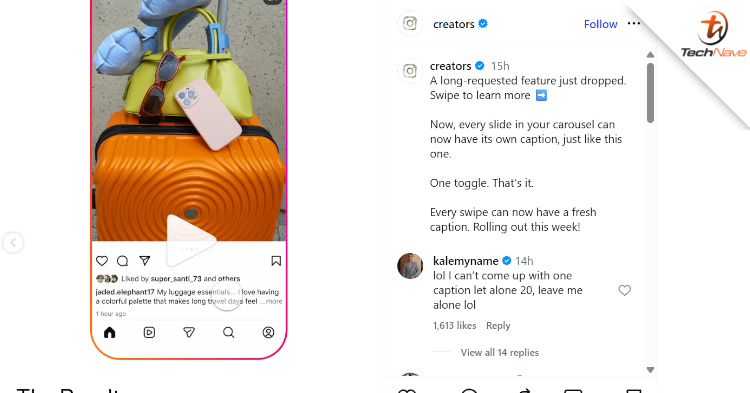
Instagram has officially introduced a major update for its carousel posts that lets creators add separate text descriptions for each image or video. This feature provides a change from the old setup, where a single caption had to represent up to 20 slides in a single post. The application update is available completely free of charge to all users worldwide.
The social media platform aims to improve storytelling and interactive context by allowing custom descriptions to display dynamically as a viewer swipes through the album. This means businesses, educators, and everyday users can now structure their posts with specific context per frame rather than cramming large paragraphs into one static text box below the media block.
A seamless way to control your narrative flow
View this post on Instagram
Moreover, managing distinct explanations previously required users to manually edit typography onto the visuals beforehand or type extensive guides explaining what each consecutive file represented. The new mechanism streamlines your productivity by moving the text directly beneath each respective item. This change also significantly benefits accessibility for individuals who utilise assistive technologies to consume app content, establishing an equivalent reading pace for all visitors.
Besides that, the feature presents a straightforward toggle option during the final preparation steps right before publishing. Users can readily decide whether to stick with the classic formatting or tap into the multi-caption workflow. The update joins recent app additions like Ultra HDR support, Night Sight capture capabilities on compatible Android models, and options to manually organise the profile grid.
How the slide caption feature works
The implementation adds a small choice panel inside the final composer stage. You can begin organising a post through the standard procedure below:
- Open the application and choose multiple files to create a carousel block.
- Proceed through the filters to reach the final share screen.
- Tap the caption section to reveal the new structural toggle.
- Select between the Single Caption option and the Multiple Captions configuration.
- Swipe through each image sequentially to type your dedicated notes.
- Publish the post to let followers see your context shift automatically as they slide across the media.
The rollout is progressing gradually to global accounts. If the functionality does not appear immediately on your device interface, it should arrive over the coming days as your regional server clusters refresh.
Personally, we feel it’s a nice addition to the platform. Especially for the content creators, social media sites and websites in Malaysia that are looking to improve their engagement online. That said, are you excited to organise your photo dumps and tutorial layouts with clean slide-by-slide text boxes? Feel free to leave your comments below.
Stay tuned to TechNave.com for more updates like this.



COMMENTS